
サブディレクトリでFuelPHPを使う
http://xxxxx.com/subdir/
みたいにサブディレクトリでFuelPHPを使いたいとき
※subdirコントローラを呼ぶんでなく
subdirがFuelPHPのトップになるイメージ
注意点
基本的に、PHPのフレームワークはpublic以外のすべてのファイルは
HTTPでアクセスできない場所に置くのがセオリーです。
なので、subdirフォルダの下にFuelPHPインストールしればいいじゃん
的なノリはしません。公開されちゃうからね。
元々こんな感じのディレクトリ構成
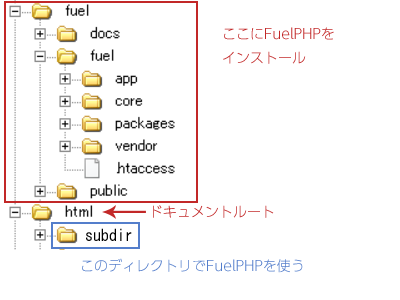
publicフォルダをコピーする
Fuelphpで用意されたpublicフォルダをsubdirフォルダにコピーします。
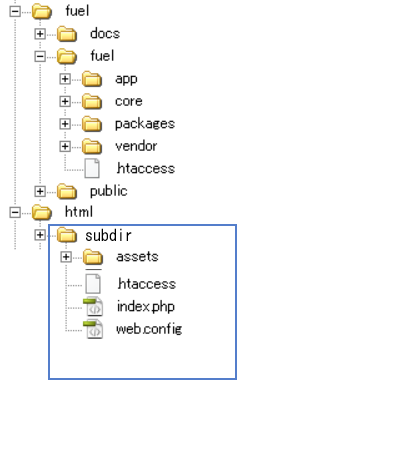
こんな感じのファイル構成になる
subdir/index.phpを編集
define('APPPATH', realpath(__DIR__.'/appまでの相対パス').DIRECTORY_SEPARATOR);
define('PKGPATH', realpath(__DIR__.'/packagesまでの相対パス').DIRECTORY_SEPARATOR);
define('COREPATH', realpath(__DIR__.'/coreまでの相対パス').DIRECTORY_SEPARATOR);
subdir/.htaccessを編集
# no php-fcgi, check for sapi and fpm
<IfModule !mod_fcgid.c>
  # for PHP5 sapi installations
  <IfModule mod_php5.c>
    RewriteRule ^(.*)$ /subdir/index.php/$1 [L]
  </IfModule>
  <IfModule !mod_php5.c>
    # for PHP7 sapi installations
    <IfModule mod_php7.c>
      RewriteRule ^(.*)$ /subdir/index.php/$1 [L]
    </IfModule>
    # for fpm installations
    <IfModule !mod_php7.c>
      RewriteRule ^(.*)$ /subdir/index.php?/$1 [QSA,L]
    </IfModule>
  </IfModule>
</IfModule>
この時点で、http://xxxxx.com/subdir/でFuelPHPにアクセス可能となるはずです
その他の注意点として
assetsフォルダが /assetsじゃない
この場合、/subdir/assets/になる
routes.phpでルーティングする場合
ルーティングマッチは、あくまでsubdirディレクトリ付で定義しないとダメ